
Thomas & Friends™: Let's Roll
StoryToysEducational
4.166.00 Reviews
- Version
- 7.8.0
- Installs
- 1.00M
- Age Rating
- Everyone
Screenshots
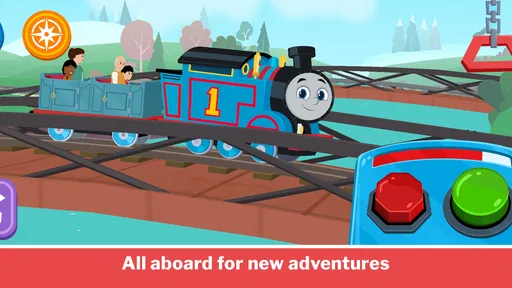
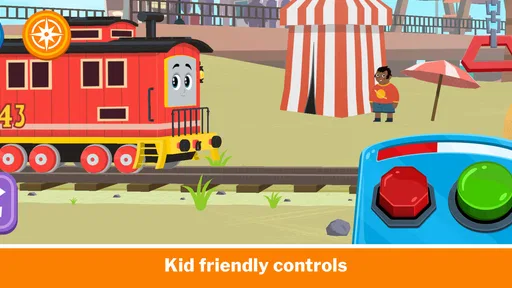
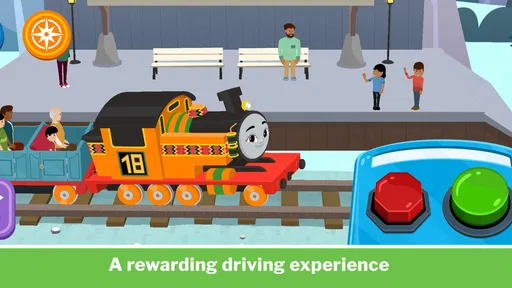
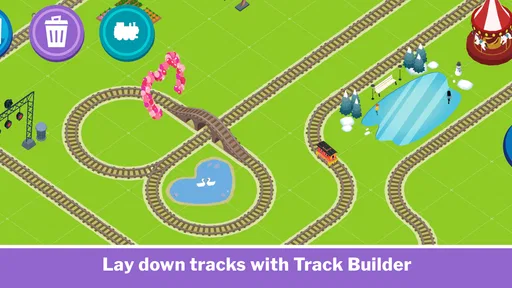
Our Review of Thomas & Friends™: Let's Roll
 Analysis by Appyee
If you’re choosing a first train game for a young child, I’d start with one practical question: do they already enjoy Thomas, or are they mainly looking for open-ended play? That distinction matters more than flashy presentation. Thomas & Friends™: Let's Roll is built around a familiar character world, so its appeal is strongest when the child wants to spend time with Thomas rather than simply experiment with any train-themed activity.
I’d also think about how the game will be used. A short session while waiting for dinner calls for clear, approachable play; a child seeking a long, creative building experience may want something less guided. This is an educational game from StoryToys, rated for Everyone, and it is free to install. That makes trying it an easy first step, but free entry is not the same as unlimited access: in-app purchases range from $4.99 to $29.99 per item, so I’d check the purchase settings before handing over a device.
A familiar world is the main advantage
Thomas gives the game an immediate point of connection for children who know the characters. In my experience, that recognition can make the first minutes less intimidating than a generic learning app: a child can focus on the train and the task instead of first figuring out an unfamiliar cast or setting. The game’s bright presentation and simple controls support that welcoming feel.
The educational angle is best understood as playful practice rather than a structured lesson. The original experience presents route choices and activities involving shapes, colors, and numbers, with problem-solving built into getting Thomas where he needs to go. I like that these ideas can be encountered in context. A parent can ask a child why they chose a particular route or invite them to name a shape, turning a brief play session into a small conversation without making it feel like homework.
Choose it for guided play, not an endless sandbox
Compared with broad train-building or open-ended creative games, this is a more character-led choice. A child who wants Thomas, familiar friends, and a clear activity to follow may settle into it more quickly than into a sandbox that asks them to invent their own goals. On the other hand, children who want to design a railway from scratch, explore without prompts, or control every part of a train journey may be better served by a building-focused alternative.
That difference also helps set expectations for adults. I wouldn’t choose this as a substitute for a full early-learning curriculum, nor would I expect a game session to teach a skill on its own. It works better as an entertaining, low-pressure way to invite observation and simple decisions. If your child loses interest whenever play has a defined task, the Thomas setting may not be enough to hold attention.
Plan around purchases and shared-device use
The game has attracted an average rating of 4.0 from around 3,000 ratings and has more than a million installs, which suggests it has found an audience, though those figures can’t tell you whether it matches your child’s preferences. It was released on April 2, 2024, and version 7.6.0 requires Android 8.0 or later. If you’re setting it up on a family device, I’d check compatibility first and then explore the opening experience together rather than assuming every part will suit every age or attention span.
For a practical routine, I’d treat it as a short, supervised option: let a child choose a task, stay nearby for the first session, and use the game’s decisions as prompts for conversation. If several children share one device, take turns choosing what to try instead of letting the quickest player dominate. Those small habits can make a character game feel more social, and they also give you a chance to notice whether the child enjoys the learning challenge or mainly wants to tap through to the next scene.
One useful trade-off is that a recognizable licensed world can motivate a child, but it can also narrow the appeal. A Thomas fan may be more willing to try a puzzle when it involves a favorite engine; a child who has no interest in the series may prefer a general activity app with a wider range of themes. I’d make the choice based on the child’s actual interests, not on the assumption that a popular character automatically makes an educational game a good fit.
Cost is another reason to make the first session deliberate. Since the initial download is free but optional purchases are available, I’d review purchase protections on the device before a child plays independently. Let them know that some choices may involve spending, and agree on a simple rule: ask an adult before confirming anything. That is more useful than relying on a young player to recognize a purchase screen on their own.
For a quick everyday example, imagine a child has a few minutes before leaving for preschool. I’d offer one short turn, ask them to describe the choice they made, and stop when it’s time to go rather than promising an open-ended play session. The game’s approachable theme can make that transition easier, but it is still screen entertainment, not a reliable way to occupy a child without limits. If you need a quiet activity for a longer stretch, books, drawing, or a less purchase-oriented offline activity may be a better match.
Parents may also wonder whether to play alongside their child or let them explore alone. I’d join at first, especially to see how the child responds to the tasks and whether any purchase prompts appear in their path. Once the child understands the controls and your household’s purchase rules, you can decide how much independence makes sense. The Everyone rating is reassuring as a broad content signal, but it doesn’t replace an adult’s judgment about screen time, spending, or whether the game’s pace suits a particular child.
Another question is whether the title is suitable for children who are not yet comfortable reading. The interface is designed to be approachable, and the original review found the controls straightforward, but I wouldn’t assume every child will understand every instruction without help. Sitting together for the first session is the easiest test. If the child can follow what to do and enjoys making choices, the game is doing its job; if they need repeated adult guidance, a simpler play activity may be less frustrating.
There is also a difference between a child enjoying the visuals and enjoying the actual play. Thomas and the colorful presentation may attract attention immediately, but I’d watch whether the child stays engaged when a task asks them to think or choose. That is a more useful measure than whether they recognize the characters. A game can be visually appealing yet still not fit a child who prefers physical toys, free drawing, or games without a goal to complete.
Where it fits in a child’s routine
The game is a good candidate for families who want a familiar, guided activity that can sit alongside toys and books, rather than replace them. It may be especially appealing when a child is already interested in Thomas and benefits from a clear prompt to follow. For a first try, keep the session short, watch for frustration, and see whether the child talks about the choices afterward. That gives you a better sense of fit than judging by the theme alone.
If the child mainly wants to build elaborate railways, a construction-focused game is likely the better choice. If they need varied practice across several early-learning topics, a broader educational app may offer a better match. And if they are not interested in Thomas, there is little reason to insist on this one when other activities can meet the same goal. The best alternative depends on whether you value character familiarity, creative freedom, or a wider range of lessons most.
Getting on Track with Thomas
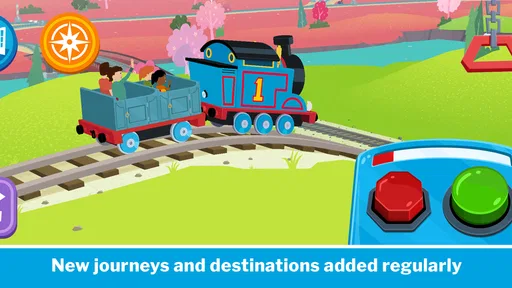
First off, downloading Thomas & Friends™: Let's Roll was a breeze. Available on both Android and iOS, this app doesn’t take up much space, so no need to fret about clearing out your photo gallery. Once installed, the interface is bright and inviting, capturing the whimsical essence of the Thomas universe.
As soon as you launch the game, you're greeted with a vibrant world full of colors and familiar faces. The app does a fantastic job of introducing you to its mechanics through an interactive tutorial, making it super easy to get started. Even if you're not tech-savvy, navigating this app is as smooth as a ride on the rails.
Gameplay and Features
The heart of Thomas & Friends™: Let's Roll lies in its engaging gameplay. You find yourself in the conductor's seat, tasked with guiding Thomas and his pals on various adventures. Each level presents new challenges and puzzles, from steering through tricky tracks to collecting special items along the way.
What really stood out to me is how the game cleverly integrates learning elements. Kids can develop problem-solving skills as they decide the best routes for Thomas. Plus, there’s a subtle educational aspect as children learn about shapes, colors, and numbers in a playful setting.
The app also boasts a variety of customization options. Whether it's upgrading Thomas with new features or dressing him in different outfits, there's plenty to personalize. This feature alone kept me and my little one entertained for hours!
Graphics and Sound
Visually, the game is stunning. The graphics are sharp and lively, bringing the charming world of Thomas & Friends to life. Each character is meticulously designed, staying true to their TV counterparts. The animations are smooth, and the attention to detail is evident in every frame.
And let's not forget the sound. The app's sound design is top-notch, with cheerful background music and authentic sound effects that transport you straight to the Island of Sodor. Even the voiceovers are delightful, adding to the overall immersive experience.
User Experience
One of the things I appreciated most about this app is its user-friendly design. The menus are intuitive, and the controls are straightforward, making it accessible for kids of all ages. Plus, there are no annoying ads popping up every few seconds, which is a huge win in my book.
The developers have also included a parental control feature, allowing you to set playtime limits and monitor in-app purchases. This thoughtful addition ensures that kids can enjoy the game safely, giving parents peace of mind.
Final Thoughts
Overall, Thomas & Friends™: Let's Roll is a delightful blend of education and entertainment. It’s perfect for keeping kids engaged and entertained while subtly teaching valuable skills. Whether you're a lifelong Thomas fan or new to the series, this app offers something for everyone. Trust me, it's a ride you won’t want to miss!
So, if you're ready to relive your childhood memories or introduce your little ones to the magic of Thomas, head over to the app store and download Thomas & Friends™: Let's Roll today. Happy rolling!
Verdict
Strengths of Thomas & Friends™: Let's Roll
- Engaging for young children with interactive elements.
- Colorful graphics capture attention effectively.
- Simple controls are easy for kids to navigate.
- Includes educational content with fun challenges.
- Encourages creativity through customizable tracks.
Limitations of Thomas & Friends™: Let's Roll
- Limited content may lead to quick boredom.
- In-app purchases can be expensive.
- Requires internet for certain features.
- Not suitable for older children or adults.
- Graphics may lag on lower-end devices.
Other Releases by StoryToys
View All
Marvel HQ: Kids Super Hero Fun
Educational4.2

LEGO® DUPLO® Peppa Pig
Educational4.3

Disney Coloring World
Educational4.3

LEGO® DUPLO® World
Educational4.3
Similar Picks in This Category
View All
Little Panda Policeman
BabyBus4.0

Monster Trucks Game for Kids 2
Raz Games4.1

Little Panda's Chinese Recipes
BabyBus4.4

Little Panda's Restaurant
BabyBus4.4

Little Panda's Ice Cream Games
BabyBus4.3

Baby Panda Care
BabyBus3.8
Frequently Asked Questions
What is the main objective of Thomas & Friends™: Let's Roll?
Thomas & Friends™: Let's Roll is a fun and engaging game primarily aimed at children. The main objective is to help Thomas and his friends navigate through various tracks, solve puzzles, and complete tasks. The game encourages problem-solving and creativity, making it both entertaining and educational.
Is Thomas & Friends™: Let's Roll suitable for all ages?
The game is designed for young children, typically between the ages of 3 to 7. It features simple controls, colorful graphics, and age-appropriate challenges. While older children and adults might find it too simplistic, it is perfect for its target audience, providing a safe and enjoyable gaming experience.
Does Thomas & Friends™: Let's Roll require an internet connection?
Thomas & Friends™: Let's Roll can be played offline, making it convenient for on-the-go entertainment. However, some features, like updates or additional content, may require an internet connection. Always check the app settings to manage data usage and download preferences.
Are there any in-app purchases in Thomas & Friends™: Let's Roll?
Yes, Thomas & Friends™: Let's Roll includes in-app purchases. These may offer additional characters, tracks, or features to enhance gameplay. Parents can manage or restrict purchases through device settings to ensure children don't accidentally make purchases without consent.
How can I ensure my child's safety while playing Thomas & Friends™: Let's Roll?
The game is designed with child safety in mind, featuring no third-party ads and parental controls. Parents can further ensure safety by reviewing privacy settings and managing in-app purchases. Engaging with the game alongside your child can also enhance their experience and safety.
Play our best games!


